
Modernizing a long-running, revenue-generating custom manufacturing e-commerce platform requires bridging two distinct worlds: high-frame-rate 3D WebGL physical material simulation on the customer-facing storefront and ultra-dense, zero-friction fulfillment workstation ergonomics in the back office. In this engineering case study—accompanied by a 1080p studio-voiced Manim mathematical animation and live SignBuilder 2.0 3D WebGL walkthrough—we examine the full-stack evolution of ArchitecturalNumbers.com across both its SignBuilder 2.0 (Three.js r186.1) 3D configurator and its unified Back-Office Order & Purchase Order Workstation.
Watch the 1080p Studio-Voiced Manim & 3D WebGL Architectural Explainer
To visualize how the storefront 3D extrusion pipeline, thin-film dielectric interference math, back-office 4-row specification grid, conditional 1-page packing list engine, and credit card top-off terminal fit together as a cohesive system, we produced a 1920×1080 voiced walkthrough combining the 4-act mathematical animation with live SignBuilder 2.0 3D WebGL viewport capture and 48 kHz True Stereo (-16 LUFS) narration:
| Walkthrough Act | Subsystem / Module | Core Engineering Specification |
|---|---|---|
Act I |
SignBuilder 2.0 3D Extrusion |
24 architectural fonts, 14 letter heights (1.5"–24"), pin-mount wall stand-offs, live CAD rulers & 3-tier IndexedDB/SW cache. |
Act II |
Three.js r186.1 MeshPhysicalMaterial |
Thin-film oxide interference (130nm–380nm), GGX brushed anisotropy & polyurethane clearcoat across 53 metal/enamel finishes. |
Act III |
4-Row Sign Specification Grid |
Full-row unquoted sign text (grid-column: 1 / -1), merged Height + Font Style, and parenthetical Baked Enamel finish cells. |
Act IV |
1-Page Print & Top-Off Terminal |
Dual 1-page Invoice vs. zero-price Packing List print modes plus PayPal Pro NVP & Authorize.Net AIM credit card top-off terminal. |
Act I: True-Font 3D Extrusion, Pin-Mount Stand-Offs & Three-Tier Caching
Unlike generic e-commerce stores that sell static SKU thumbnails, custom architectural signage requires customers to preview exact typographic proportions across 24 authentic architectural font families (such as Americana Bold, Ribbon, Futura, Optima, and Helvetica), 14 physical letter heights (from 1.5 Inch up to 24 Inch), and 53 metal and baked enamel finishes.
In SignBuilder 2.0 and our subsequent progressive-disclosure UX architecture, every keystroke triggers a deterministic 3D geometry pipeline:
- True-Font Bevel Extrusion: Each character glyph is parsed into vector contours and extruded into a 3D mesh with calibrated depth (
0.375"to0.75"scaled to letter height) and chamfered bevels that catch specular highlights along glyph edges. - Pin-Mount Spacer Stand-Offs & Raycast Shadows: When a customer selects
0.5"or1.0"wall spacers, cylindrical mounting pins are procedurally positioned behind each glyph stroke, offsetting the 3D letters from the architectural wall plane and projecting physically accurate directional drop shadows. - Real-Time CAD Dimension Rulers: Bounding-box world coordinates are continuously measured to render live horizontal width and vertical height rulers directly inside the 3D viewport.
- Three-Tier Asset Caching (
SignBuilder2Cache): Font JSON vectors and procedural PBR normal maps are cached across an L1 in-memoryMap, an L2IndexedDBobject store, and an L3Service Workercache—reducing subsequent character extrusion latency to0msnetwork overhead.
Act II: Three.js r186.1 MeshPhysicalMaterial & Thin-Film Dielectric Interference
Standard metallic shaders (MeshStandardMaterial) rely solely on two scalar parameters—metalness and roughness—which fail to capture the complex optical behavior of real-world architectural metals such as brushed satin aluminum, oiled bronze, oxidized copper, and polyurethane-coated Aztec Gold baked enamel.
By upgrading the rendering engine to Three.js r186.1 and migrating the material factory to THREE.MeshPhysicalMaterial, we unlocked four critical physical optics layers:
- Thin-Film Dielectric Interference (
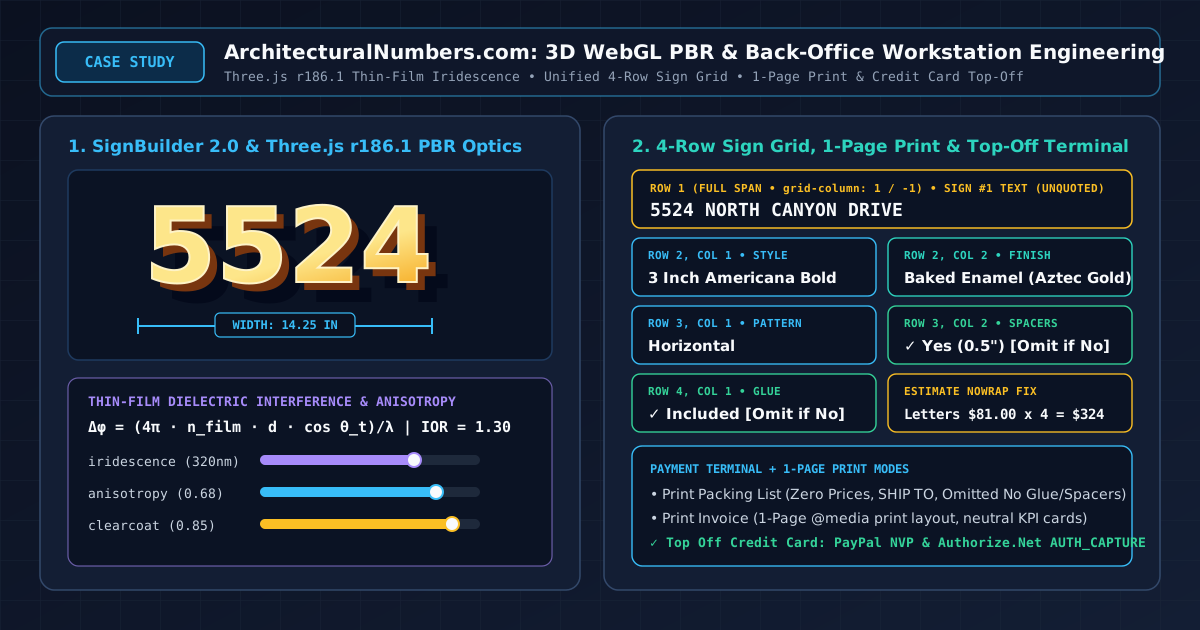
iridescence,iridescenceIOR,iridescenceThicknessRange): Metals exposed to heat or anodization develop a microscopic dielectric oxide layer of thickness $d$ (measured in nanometers, typically $130\text{ nm}$ to $380\text{ nm}$) and refractive index $n_{\text{film}} \approx 1.30$. Light reflecting off the top air-oxide boundary interferes with light reflecting off the bottom oxide-metal boundary according to the optical path difference: $$\Delta\phi = \frac{4\pi \cdot n_{\text{film}} \cdot d \cdot \cos\theta_t}{\lambda}$$ Combined with Schlick's Fresnel approximation $R(\theta) = R_0 + (1 - R_0)(1 - \cos\theta)^5$, grazing angles produce subtle, realistic chromatic shifts across bronze, brass, and anodized aluminum finishes. - Anisotropic Brushed Microfacets (
anisotropy,anisotropyRotation): Brushed architectural numbers exhibit directional microscopic grooves. Instead of isotropic circular specular highlights, the r186.1 GGX anisotropic microfacet distribution stretches specular reflections perpendicular to the brush grain direction. - Polyurethane Clearcoat Layer (
clearcoat,clearcoatRoughness): Baked Enamel finishes (including Aztec Gold and Patina Green) feature a protective glossy or satin clearcoat over the pigmented base layer, simulated via a secondary dielectric specular lobe. - Live Back-Office 3D Material Workbench (
adminSignBuilder3D.php): Administrators can tune all physical parameters—includingmetalness,roughness,clearcoat,iridescence,iridescenceIOR,anisotropy, andsheen—using live sliders in the back office, persisting validated JSON configurations throughSignBuilder2Config.phpand/api/signbuilder2/specs.php.
Act III: The Unified 4-Row Sign Specification Grid & Order Workstation Overhaul
While the storefront configurator handles complex 3D rendering, the back-office fulfillment team processes daily custom manufacturing orders across four core views: the primary Order Workstation (orderMod.php) and the three Purchase Order batch queues (ordersSendPO.php, ordersConfirmPO.php, and ordersShipWOL.php).
Historically, each sign item rendered a tall, fragmented list of 8 separate specification cards with decorative emojis, quotation marks around sign text (which cramped long address strings into a narrow half-column), a bulky dark preview header bar, and multi-color KPI cards at the top of the screen that pushed the actual order items below the fold.
1. The Standardized 4-Row, 2-Column Specification Grid
Following direct operational feedback, we re-engineered .sign-specs-grid across all four back-office modules and the printable Packing List into a strict, scannable 4-row layout:
- Row 1 (Full-Row Span,
grid-column: 1 / -1): DisplaysSign #N Textacross both columns without quotation marks. Whether a customer orders a 4-digit house number (5524) or a 35-character spelled-out street address (FIFTY FIVE TWENTY FOUR CANYON DR), the text has a dedicated full-width row that never truncates or collides with adjacent metadata. - Row 2, Column 1 (Combined Height & Font Style): Merges
styleSizeandstyleinto a single unifiedStylecell—for example,3 Inch Americana Bold—matching the exact phrasing used on factory purchase orders. - Row 2, Column 2 (Finish + Baked Enamel Color in Parentheses): Combines the primary material finish and any selected Baked Enamel color into a single
Finishcell—for example,Baked Enamel (Aztec Gold). - Row 3, Column 1 (Pattern): Displays the mounting orientation (
HorizontalorVertical). - Row 3, Column 2 (Spacers): Displays spacer selection and stand-off size (
✓ Yes (0.5")orNo). - Row 4, Column 1 (Glue,
grid-column: 1 / 2): Displays adhesive inclusion (✓ Included ($6.00)orNo).
2. De-Cluttered Card Headers, Combined Workflow Timeline & Neutral KPIs
To maximize information density and eliminate visual noise:
- KPI Grid Relocated & Neutralized: The 4 KPI summary cards (Grand Total Charged, Subtotal & Breakdown, Production PO Amount, and External References) were moved below the Ordered Custom Signs card, compacted in height, stripped of decorative icons and profit margin subtext, and styled in a high-contrast neutral slate palette.
- Merged Status & Fulfillment History: The chronological Fulfillment History audit trail was compacted and integrated directly inside the Order Status & Fulfillment Workflow card, eliminating a redundant standalone card.
- Streamlined Card Titles: Right-hand header badges (such as User #, Catalog & Math Verification, Internal Audit Log, and Merchant Gateway) were removed, and Staff Comments & Operational Notes was simplified to Notes.
Act IV: Dual 1-Page Print Engine, Conditional Packing List & Credit Card Top-Off Terminal
1. 1-Page Print Invoice vs. 1-Page Print Packing List
Warehouse fulfillment requires two distinct physical documents from the same order screen, both of which must fit cleanly on a single printed page:
- Print Invoice (
printOrderMode('invoice')): Uses@media printrules (@page { size: auto; margin: 0.3in; }) to hide the top navigation bar (.admin-top-navbar), left sidebar (.admin-sidebar-td), interactive form controls, and payment terminal, compacting the 2-column order layout so the complete financial invoice prints on 1 page. - Print Packing List (
printOrderMode('packing')): Togglesbody.print-mode-packing-listto render a dedicated#printable-packing-listsheet containing zero prices—displaying only the Order # and Date, the SHIP TO recipient and delivery address, the 4-row sign specification grid for each item, and the order Notes. - Conditional Omission of Unused Accessories: In the Packing List, if Spacers or Glue is
No, those boxes are omitted completely from the printed sheet so warehouse packers only see accessories that actually need to be placed in the shipping box.
2. Left-Column Merchant Payment Terminal & Credit Card Top-Off
Customers frequently call or email after placing an order to upgrade letter height, add wall spacers, or include tubes of mounting adhesive. Previously, the back office only supported full or partial refunds, forcing staff to process add-on charges manually outside the workstation.
We relocated Payment Terminal: Refunds & Cancellations to the left column directly beneath Payment Information and engineered a dedicated Top Off / Additional Charge workflow (action="topoff"):
- PayPal Website Payments Pro NVP (
order::processTopOffPP): Automatically attempts a reference charge viaMETHOD=DoReferenceTransactionusing the originalREFERENCEID(cc_trans_id), and seamlessly falls back toMETHOD=DoDirectPayment(PAYMENTACTION=Sale) when full card details are stored on the order record. - Authorize.Net AIM (
order::processTopOff): Dispatches anx_type=AUTH_CAPTUREtransaction against the Authorize.Net gateway endpoint. - Atomic Ledger & Audit Trail Update: Upon gateway approval, the system increments
orders.grandTotalby the top-off amount and appends a timestampedTop-Off Charged ($XX.XX)entry toOrderHistory.
3. Single-Line Price Column in the Classic SignBuilder Estimate Table
Finally, in the Classic SignBuilder Estimate view (showEstimate.php) and Checkout Confirmation view (orderConfirm.php), three-digit letter totals such as Letters $81.00 x 4 = $324.00 previously wrapped onto two lines inside the 30%-wide price column. Widening the outer table to 85%, rebalancing the column split to 58% / 42% (min-width: 240px), and enforcing white-space: nowrap across all price breakdown cells guarantees crisp single-line alignment at every price tier.