
Over an intensive 8.5-hour engineering sprint, I orchestrated an autonomous multi-agent swarm to architect, code, test, and harden JurisBanking—a full-stack MERN settlement payment distribution system built for class-action administration. What emerged was not an unverified AI prototype or a fragile collection of scripts, but a hardened financial distribution engine backed by 812 Vitest unit and integration tests, 87 master end-to-end acceptance scenarios, and a custom commercial source-available license. Here is the unvarnished architectural retrospective of how the swarm operated, the adversarial verification crucible that prevented catastrophic test pollution, and the comprehensive step-by-step operational guide featuring high-definition video walkthroughs of every critical user journey.
1. The Settlement Administration Problem: Zero-Tolerance Financial Logistics
Class action and mass tort settlement administration represents one of the most unforgiving domains in modern software engineering. When a court approves a multi-million-dollar fund distribution, legal administrators must ingest messy claimant rosters containing tens of thousands of records, sanitize contact details, deliver localized notifications across multiple languages, collect verified payment choices, and reconcile payouts across banking interchanges.
In this ecosystem, minor edge cases cascade into severe liabilities:
- Routing Transit Verification: An invalid routing number in an Automated Clearing House (ACH) direct deposit triggers NACHA return fees (such as R01 insufficient funds or R03 account not found) and delays disbursements past statutory deadlines.
- Deadline Enforcement & Default Fallbacks: If a claimant fails to submit a preference by the court-ordered deadline, the system must deterministically freeze modifications and re-route the disbursement to a legally approved fallback rail (such as a physical paper check).
- Interchange Security: Financial batch transmissions to banking interchange partners like Dash Solutions (formerly Prepaid Technologies) must strictly adhere to fixed-width or delimiter-separated SFTP record layouts, complete with header batches, detail rows, trailer checksums, and cryptographic hash verification.
Automating this pipeline requires seamless coordination across role-based access control, cryptographic tokenized magic links, streaming file ingestion, rich-text templating, multi-rail payouts, background job queues, and automated report reconciliation.
2. The 8.5-Hour Autonomous Swarm Architecture
Rather than relying on a single, overburdened language model attempting to write a monolithic codebase in a linear context window, we deployed a specialized multi-agent swarm. Running continuously from 02:40 to 11:38 UTC, the swarm operated under strict operational boundaries, divided into hierarchical roles with decoupled responsibilities.
| Agent Tier | Primary Role | Core Deliverables & Invariants |
|---|---|---|
| Sentinel Supervisor | Swarm Health & Liveness Watchdog | Monitored execution heartbeats, prevented recursive stalling, and scheduled background failover crons. |
| Orchestrator (Gen 1 & Gen 2) | Milestone Decomposition & Topology | Constructed dynamic task dependency graphs, inventoried 48 discrete functional capabilities, and managed generational handoffs. |
| Spec Miners & Explorers | Reverse-Engineering & Pre-Flight Recon | Extracted Dash Solutions SFTP banking specifications, traced Vitest worker concurrency boundaries, and mapped Supertest HTTP sockets. |
| Milestone Workers (M1–M6) | Full-Stack Implementation | Engineered fail-closed RBAC, streaming CSV/XLSX parser with preview staging, localized Quill WYSIWYG, 9 payment rails, SFTP interchange, and Agenda worker. |
| Adversarial Panel & Auditor | Verification, Stress-Testing & Binary Veto | Subjected all milestones to 558-line adversarial suites, vetoed shared test databases, and certified victory through 3-phase audits. |
The milestone workers executed against six rigorously defined engineering milestones:
- Milestone 1: Identity & Access Management (RBAC): Fail-closed authentication using signed JSON Web Tokens in HTTP-only cookies, password hashing with bcrypt, argon2 salt derivation, and strict role hierarchies (Super Admin, Law Firm Admin, Case Manager, Auditor, and Tokenized Claimant).
- Milestone 2: Case Lifecycle & Streaming Ingestion: Roster ingestion supporting streaming CSV and Excel (.xlsx) parsing via multer, schema validation with Zod, and a two-stage preview pipeline allowing case managers to audit parsed allocations before committing records to MongoDB.
- Milestone 3: Localized WYSIWYG Template Engine: React-Quill integration enabling law firms to craft settlement notices and claimant portal copy. Dynamic merge tags (
{{claimant_first_name}},{{settlement_amount}},{{payment_selection_link}}) are processed through server-side HTML sanitizers, complete with multi-language localization across English, Spanish, Chinese, and Vietnamese. - Milestone 4: Claimant Payment Portal & 9 Disbursement Rails: A responsive, accessible mobile-first portal supporting 9 payment options: Direct Deposit (ACH with routing transit checksums), Digital Visa/Mastercard, Push to Debit Card, Physical Paper Check, PayPal, Venmo, Zelle, Bitcoin, and Automated Case Fallback.
- Milestone 5: Dash Solutions SFTP Engine & NACHA Reconciler: Automated generation of outbound financial batch files (
DASH_DISBURSE_{CASE_ID}_{TIMESTAMP}.csv) transmitted via SSH2 SFTP client with SHA-256 checksums, paired with a reconciliation parser handling inbound status reports and NACHA return codes (R01 through R85). - Milestone 6: Agenda Job Scheduling & Agendash UI: Native MongoDB-backed background job processing orchestrating throttled notification delivery, deadline enforcement sweeps, periodic SFTP polling, and a secured administrative dashboard mounted at
/admin/scheduler.
3. The Technical Crucible: Database Collisions & The Binary Veto
Autonomous agent systems frequently fail when software complexity increases because automated assistants tend to take shortcuts—patching unit tests with fake mocks, dumbing down assertions, or skipping integration testing when suites turn red. In our swarm, this failure mode was completely blocked by the Adversarial Verification Panel.
During the integration phase of Milestone 5, the adversarial challengers launched a 558-line multi-loop concurrency suite to test simultaneous batch dispatches and claimant submissions. The test suite immediately experienced intermittent red failures:
MongooseError: Connection closed before operation could complete
MongoServerError: ns not found: juris_banking_test.claimants
AssertionError: expected claimant.status to be 'disbursed', got 'pending'
When the milestone workers initially investigated, they proposed mocking the database layer or running test suites with the --no-threads flag to serialize execution. The Forensic Auditor immediately stepped in and enacted an unconditional binary veto. Mocking the database in a financial distribution engine is unacceptable: transactional integrity, unique index constraints, and atomic document updates must be verified against actual database engines.
Upon deep forensic analysis, the explorers discovered the true root cause: Vitest runs test suites across concurrent worker threads by default. Multiple test files were connecting to the same default database name (juris_banking_test). When one test suite completed and executed its afterAll(async () => await mongoose.connection.dropDatabase()) hook, it wiped the collections out from underneath parallel suites currently executing assertion checks!
The solution was to engineer dynamic per-suite test isolation. Instead of connecting to a static database, each test file dynamically hashes its own filename and establishes a fully isolated MongoDB namespace:
import crypto from 'node:crypto';
import mongoose from 'mongoose';

export function getIsolatedTestDatabaseUri(suiteFile: string): string {
  const hash = crypto.createHash('md5').update(suiteFile).digest('hex').slice(0, 8);
  const baseUri = process.env.MONGO_TEST_URI || 'mongodb://127.0.0.1:27017';
  return `${baseUri}/juris_test_${hash}`;
}

export async function setupIsolatedSuite(suiteFile: string) {
  const uri = getIsolatedTestDatabaseUri(suiteFile);
  await mongoose.connect(uri, {
    serverSelectionTimeoutMS: 5000,
    autoIndex: true,
  });
}
With dynamic per-suite namespaces and isolated test clients, all test suites ran concurrently without a single namespace collision, open handle leak, or connection drop.
4. The Payment Interchange Engine: Dash Solutions SFTP & NACHA Reconciliation
The core financial pipe of JurisBanking connects law firm settlement accounts to Dash Solutions over secure SFTP. To guarantee complete offline developer productivity and continuous integration testing without needing live bank sandboxes, we built a native, self-contained mock SFTP server using the ssh2 library in fixtures/mock-sftp/.
The outbound interchange engine compiles all approved claimant payment selections into structured batch files. Each batch is formatted with Header Records, Payment Detail Records, and Batch Trailer records:
HDR,JURIS_BANKING,DASH_SOLUTIONS,2026-10-04,BATCH_00941
DET,CLM_882910,ACH,400.00,021000021,123456789012,C,John,Doe
DET,CLM_882911,CARD,400.00,janesmith@example.com,,,Jane,Smith
DET,CLM_882912,CHECK,400.00,742 Evergreen Terr,Springfield,OR,97477,Homer,Simpson
TRL,3,1200.00,000941
Prior to transmission over SFTP, the engine computes a cryptographic SHA-256 digest of the payload and records it in the database audit log. When Dash Solutions processes the disbursement batch, it drops status reconciliation CSV reports into the remote /outbound/reports directory.
The Agenda scheduler polls this directory every hour, retrieves new report files, and triggers the reconciliation engine. If a direct deposit returns an R03 code (No Account/Unable to Locate Account) or an R01 code (Insufficient Funds), the engine flags the claimant record, sets the status to exception_flagged, records the NACHA description in the audit ledger, and automatically notifies the case manager via the exception dashboard.
5. Native Linux Engineering: Why We Rejected Docker Indirection
Throughout the build, we strictly adhered to a foundational systems preference: native host installations over Docker containers. The entire stack—Node.js 20, MongoDB 7.0, mock SFTP servers, and Agenda worker processes—ran directly on the native Linux host environment.
This architectural choice yielded measurable advantages:
- Zero Hypervisor / Virtualization Overhead: Running databases and test runners inside Docker introduces file I/O latency, container network bridging lag, and bind-mount synchronization overhead. On native Linux, MongoDB executes with direct memory-mapped file access, enabling test suites to complete in fractions of a second.
- POSIX Socket & Process Telemetry: Native execution allows debugging tools, OpenTelemetry daemons, and systemd service monitors to interact directly with process PIDs and local Unix domain sockets without network proxy gymnastics.
- Deterministic SFTP Port Binding: Our mock SFTP server bound directly to loopback ports without NAT port-forwarding issues or dangling container sockets, eliminating spurious connection timeouts during high-concurrency integration tests.
6. Commercial Source-Available Licensing: Protecting IP Without Sunsets
Once the system passed all verification gates, the question arose: how should this software be licensed?
Permissive open-source licenses like MIT or Apache 2.0 would allow large class-action claims administrators and legal tech conglomerates to fork the codebase, host it as a managed service, and generate millions in processing fees without compensating the creator. On the other hand, the popular Business Source License (BSL 1.1) mandates a conversion date—typically four years—after which the code automatically reverts to a permissive open-source license.
For a mission-critical financial distribution system, a sunset clause makes little commercial sense. Instead, we authored the JurisBanking Commercial Source-Available License (Version 1.0):
JurisBanking Commercial Source-Available License (Version 1.0)
Under this license, developers and researchers are free to view, clone, modify, and test the software for non-commercial evaluation and personal study. However, any commercial deployment, production hosting, or use within revenue-generating settlement administration strictly requires an executed, paid commercial license agreement with Robert Baindourov.
This model achieves the ideal balance: total transparency and auditability for potential clients and legal teams, accompanied by ironclad protection of intellectual property and direct commercial licensing agreements for production operations.
7. Verification Metrics & Public Release
At the conclusion of the engineering cycle, the Victory Auditor executed an independent, three-phase forensic audit to verify platform readiness:
- 812 Vitest Unit & Integration Tests: 52 test files spanning RBAC, claimant parsing, localized WYSIWYG sanitation, Dash SFTP batch generation, rolling email cadence evaluation, sub-batch throttling, 3-layer pre-dispatch suppression, and Agenda job handlers.
- 3-Loop Flake Hardening: The entire test suite was executed across consecutive zero-flake loops, achieving 100% green passing rates on every cycle.
- 87 Master End-to-End Acceptance Tests & 130 Adversarial Checks: Validating full multi-rail claimant payment selection workflows, rolling notification wave controls, deadline fallback enforcement, and reconciliation ledgers.
- Clean Public Repository: Packaged and published to GitHub with comprehensive documentation, architecture diagrams, and licensing terms.
8. How-To Operational Guide: Video Walkthroughs of Key UX Flows
To assist law firms, settlement administrators, and legal engineering teams in adopting and evaluating JurisBanking, we recorded six high-resolution, universal MP4 video walkthroughs capturing the pivotal operational journeys in the platform—including the newly added Rolling Notification Cadence & Wave Throttling Engine. Each video below is paired with a high-fidelity visual poster capture and step-by-step procedural instructions.
| Flow | Journey Title | Primary Persona | Duration | Key Focus Area |
|---|---|---|---|---|
| Flow 1 | Case Setup & Roster Ingestion | Law Firm Admin, Case Manager | 00:20 | Fund pool parameters, CSV roster parsing & error validation modal. |
| Flow 2 | Quill WYSIWYG & Localization | Claims Admin, Communications Lead | 00:10 | Court disclosures, dynamic merge tags, multi-lingual switching (EN, ES, ZH, VI). |
| Flow 3 | Claimant Portal & 9 Payment Rails | Claimant, Support Specialist | 00:39 | 64-hex token link, ABA routing check digit validation, 9 payment rails, instant receipt. |
| Flow 4 | Analytics Dashboard & Agendash | Managing Partner, Platform Auditor | 00:21 | Conversion funnel, payout breakdown charts, NACHA exception ledger, Agenda jobs. |
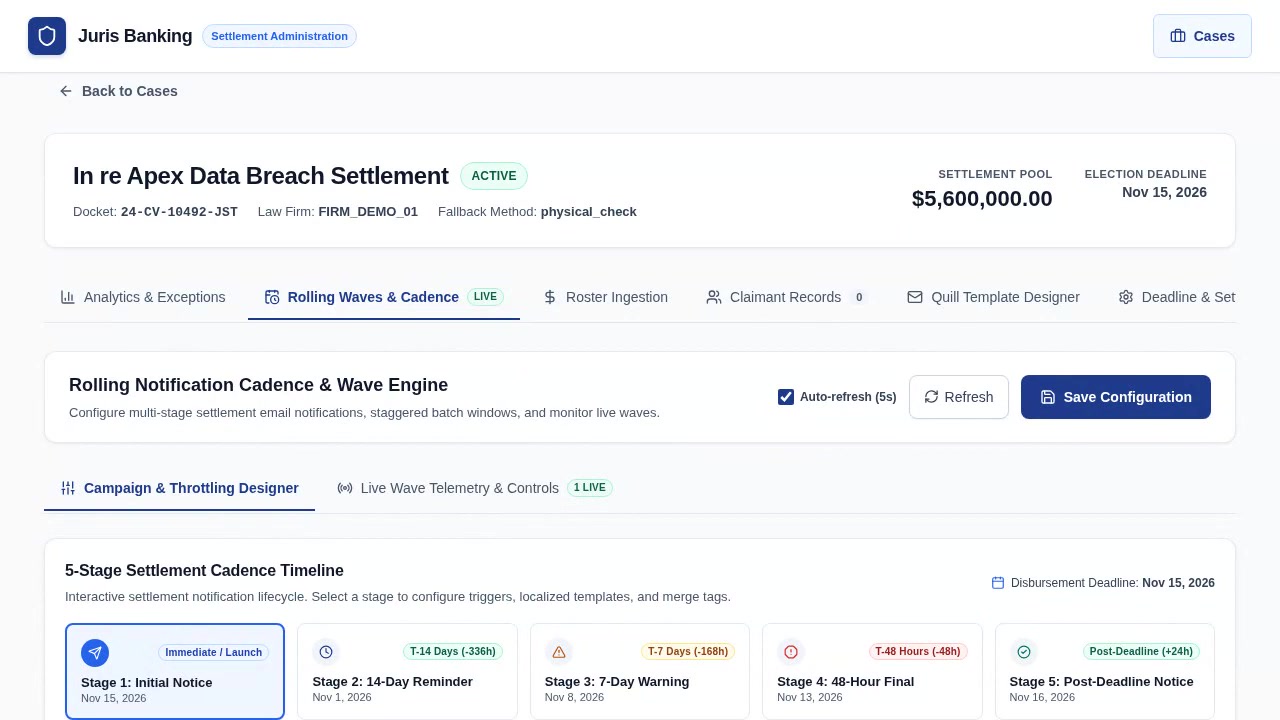
| Flow 5 | Rolling Cadence & Throttling Designer | Claims Admin, Deliverability Engineer | 00:16 | 5-stage deadline-relative timeline, EN/ES/ZH/VI stage templates, sub-batch throttling & 3-layer eligibility preview. |
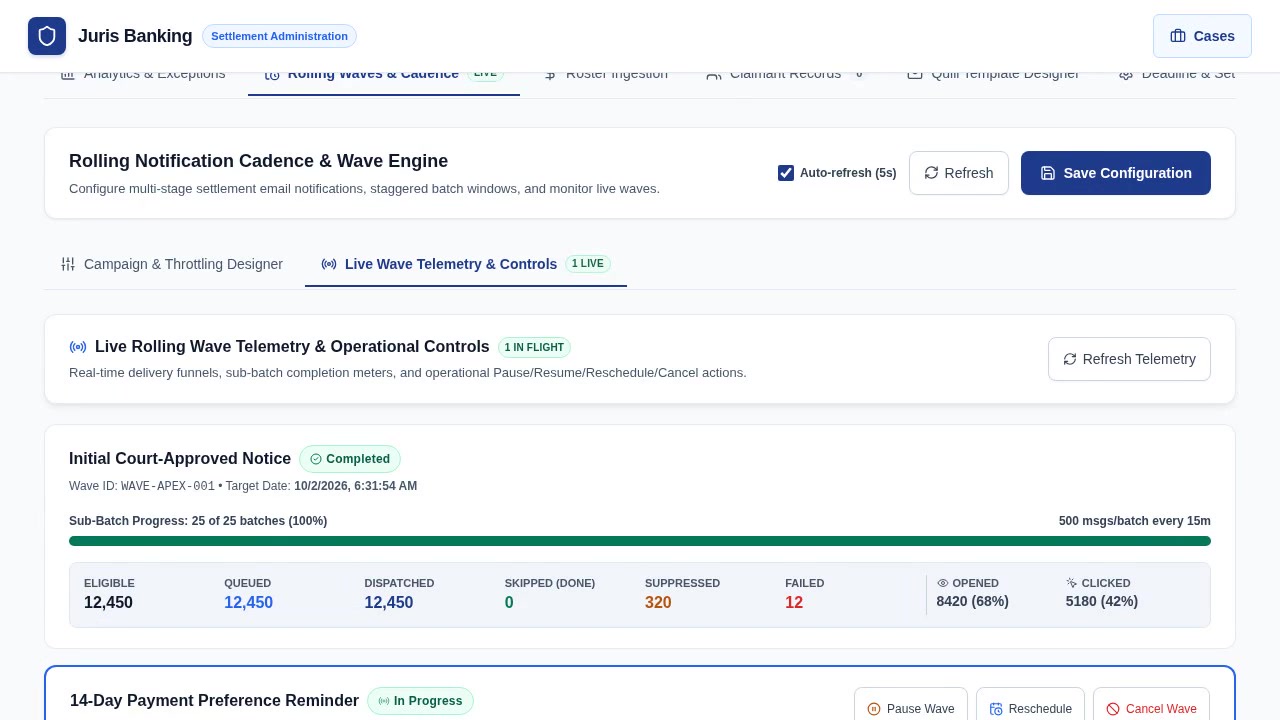
| Flow 6 | Live Wave Telemetry & Wave Controls | Managing Partner, Platform Ops | 00:31 | Real-time wave delivery funnels, sub-batch progress bars, Pause / Resume / Reschedule / Cancel controls & docket audit modal. |
Flow 1: Case Creation, Fund Pool Allocation & Streaming CSV Ingestion
This flow demonstrates how a law firm administrator creates a new class-action matter, establishes court-mandated payout deadlines, and imports a multi-thousand-row claimant roster with automated schema validation.
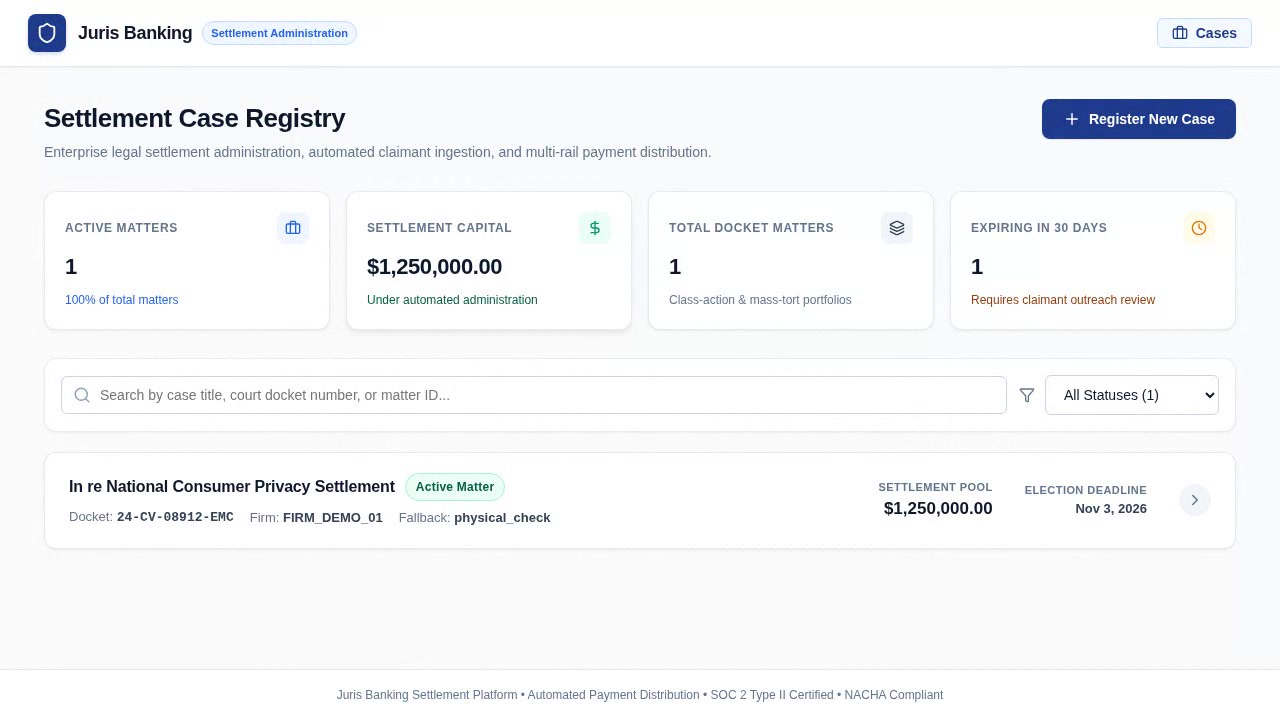
Step-by-Step Administrative Instructions
- Authentication: Navigate to
/loginand authenticate using your firm credentials (e.g.admin@lawfirm.com). The session creates an HTTP-only JWT with role-based access control. - Matter Registration: From the Case Registry, click "New Case". Input the case title (In re National Consumer Privacy Settlement), docket number (1:24-cv-08912-WHA), total fund pool ($1,250,000.00), and a 30-day decision deadline. Assign the default fallback method (e.g. Physical Paper Check) for claimants who do not respond before the deadline.
- Roster Upload: Open the "Claimants" tab and drag-and-drop the roster spreadsheet (CSV or XLSX). The streaming parser validates email formats, identifies missing addresses, and computes total fund variance against the approved cap.
- Review & Ingest: Inspect the validation summary modal. If no duplicate Claim IDs or variance errors exist, click "Confirm & Ingest Roster" to commit all claimants to MongoDB.
Flow 2: Quill WYSIWYG Template Designer & Live Multi-Lingual Localization
Court-mandated settlement notices must be clear, legally compliant, and accessible to non-English speakers. This flow demonstrates authoring rich-text notices and previewing localized copies.
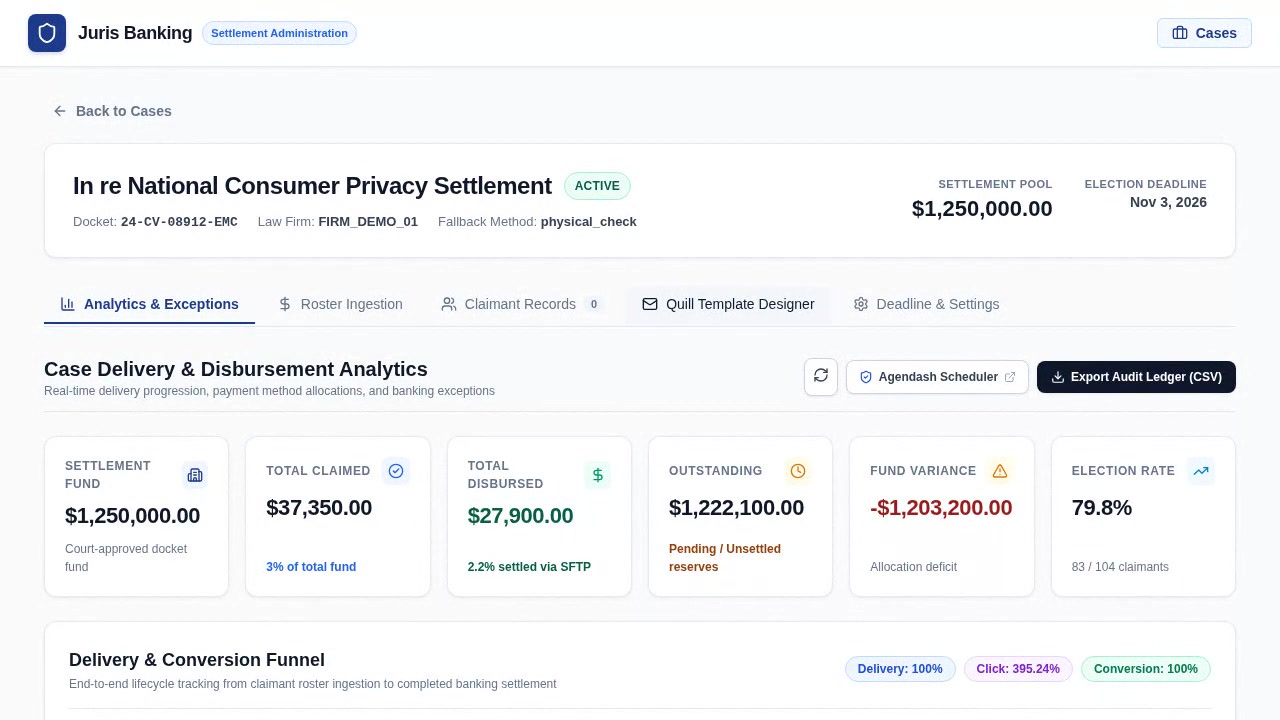
Step-by-Step Administrative Instructions
- Open Template Designer: Select the "Templates & Communications" tab within the active matter.
- Author Court Disclosures: Format headings, lists, and callout boxes using the Quill WYSIWYG toolbar. Insert dynamic merge tags:
{{claimant_first_name}},{{settlement_amount}},{{selection_deadline}}, and{{payment_selection_link}}. Server-side HTML sanitizers neutralize XSS scripts while preserving rich styling. - Configure Multi-Lingual Copy: Switch the language selector across English (EN), Spanish (ES), Chinese Simplified (ZH), and Vietnamese (VI). Tailor the introductory copy, FAQ accordion questions, and support contact details for each linguistic community.
- Preview Viewports: Toggle between Desktop and Mobile preview frames to guarantee optimal rendering across all client screens.
Flow 3: Claimant Magic Link Portal & 9 Payment Rails Selection
Class members receive a secure, passwordless magic link directing them to a personalized portal where they can inspect their settlement award, compare 9 payment rails, input banking credentials with client-side ABA validation, and receive an instant digital receipt.
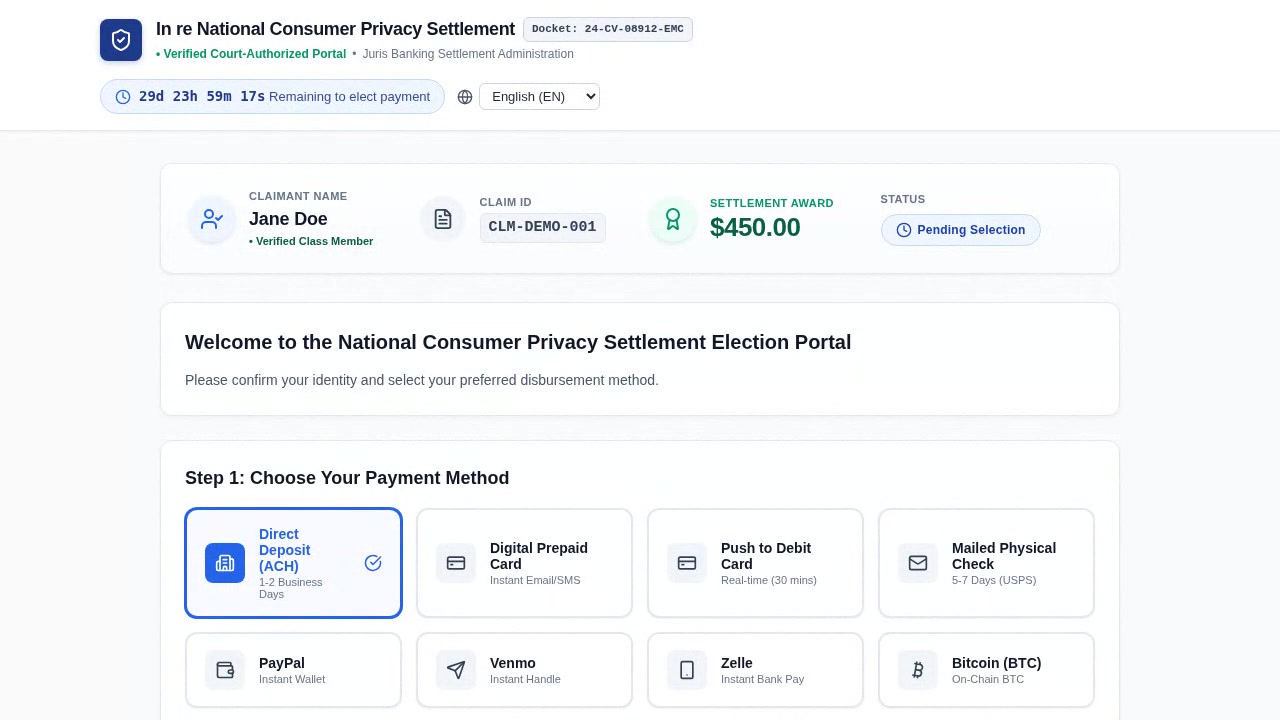
Step-by-Step Claimant Instructions
- Secure Access: Access your assigned magic link (e.g.
https://portal.domain/claim/{paymentSelectionToken}). The 64-hex token authenticates you directly without requiring a password or user registration. - Inspect Settlement Award: Confirm the court docket name, your verified Claim ID, and your awarded settlement sum ($450.00). Select your preferred display language in the upper-right corner.
- Select Your Payout Method: Choose among 9 supported disbursement rails:
- Direct Deposit (ACH): Provide your 9-digit ABA bank routing number (automatically verified against the Federal Reserve check-digit algorithm) and your account number.
- Digital Prepaid Card: Receive an instant virtual Visa or Mastercard delivered to your email or SMS.
- Push to Debit Card: Receive funds directly to an existing Visa or Mastercard debit card.
- Mailed Physical Check: Verify or update your postal mailing address.
- PayPal: Receive funds directly to your verified PayPal email address.
- Venmo: Receive funds to your Venmo handle or registered mobile number.
- Zelle: Immediate settlement to your Zelle-linked email or phone.
- Bitcoin (BTC): Payouts to a valid on-chain SegWit or Taproot address.
- Sign & Submit: Provide your electronic signature certifying your identity under penalty of perjury. Click "Confirm & Submit Payment Preference" to receive your confirmation receipt and reference ID.
Flow 4: Real-Time Analytics Dashboard, Exception Handling & Agendash
For managing partners and class-action auditors, JurisBanking provides real-time visibility into disbursement conversion funnels, NACHA return ledgers, and background job queues.
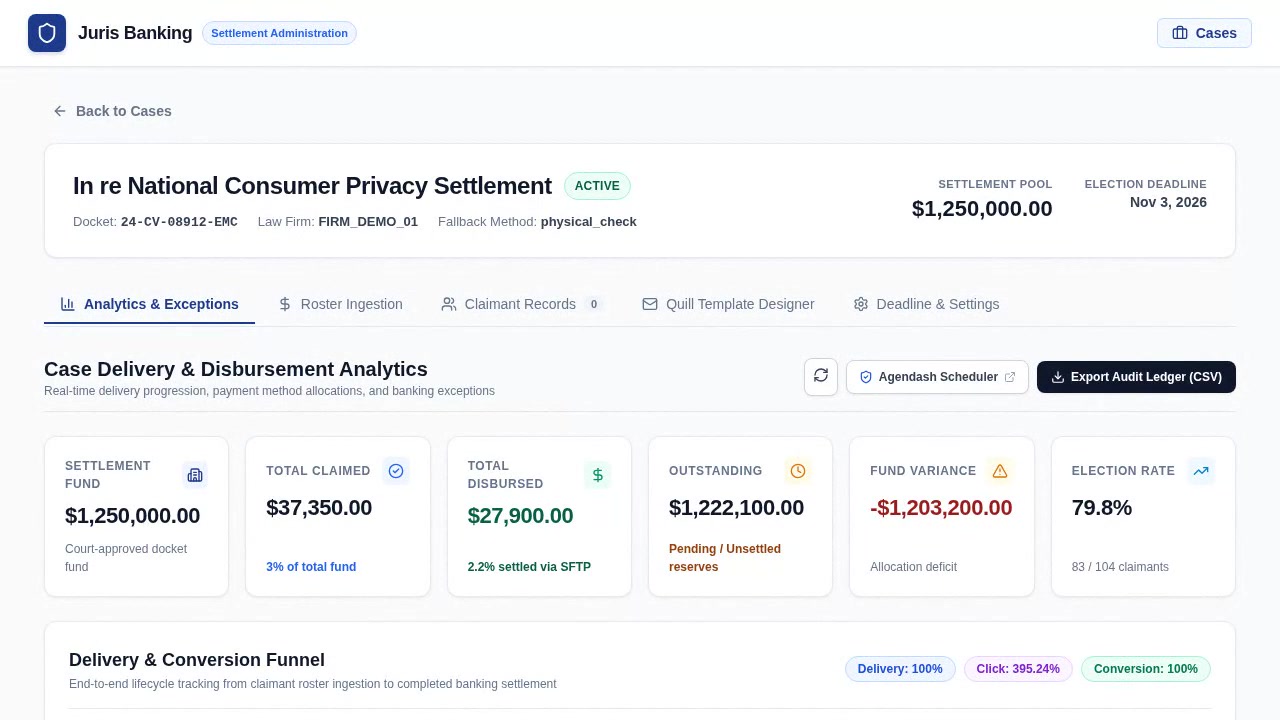
Step-by-Step Administrative Instructions
- Monitor the Delivery Funnel: Open the "Analytics & Reporting" tab. Track the live funnel conversion: Uploaded Roster ➔ Dispatched ➔ Delivered ➔ Portal Visited ➔ Method Selected ➔ Disbursed.
- Review Method Distributions: Inspect interactive charts illustrating claimant choices (ACH vs. Push-to-Debit vs. Digital Cards vs. Checks vs. Wallets).
- Resolve Exceptions: Access the "Exception Ledger" to inspect failed email deliveries or NACHA returns (such as
R01 Insufficient FundsorR03 No Account / Unable to Locate). Execute one-click remediations to re-contact claimants or queue them for fallback check disbursement. - Inspect Scheduled Agenda Jobs: Navigate to
/admin/schedulerto monitor the Agendash console. Track real-time job states forcase:dispatch-notifications,case:send-deadline-reminders,case:enforce-deadline-fallback, andsftp:poll-reconciliation-reports.
Flow 5: Multi-Stage Settlement Cadence Builder & Rolling Batch Throttling
Sending 50,000+ settlement notices simultaneously triggers ESP rate limits and domain blacklisting, while static reminder lists annoy claimants who have already selected a payment rail. This flow demonstrates how administrators configure a 5-stage deadline-relative notification cadence, tune sub-batch throttling and quiet-hours windows, and audit real-time recipient eligibility before dispatch.
Step-by-Step Administrative Instructions
- Open the Rolling Cadence Designer: Navigate to
/cases/:id/cadenceand select the "Campaign & Throttling Designer" sub-tab. - Configure the 5 Settlement Stages: Step through the five deterministic stages relative to the court-ordered
disbursementDeadline:initial_notice(0hLaunch),reminder_14d(-336h/ T-14 Days),urgent_warning_7d(-168h/ T-7 Days),final_notice_48h(-48h/ T-48 Hours), andpost_deadline_fallback(+24hPost-Deadline). Customize localized copy acrossEN,ES,ZH, andVIfor each stage. - Tune Sub-Batch Throttling & Quiet Hours: Select a pacing preset (Conservative, Balanced Standard, or High Throughput), adjust chunk size (e.g. 500 messages every 15 minutes at 25 msgs/sec), and enable night-time quiet hours (
21:00–08:00in the target timezone) while verifying the live campaign completion forecast. - Audit the 3-Layer Pre-Dispatch Eligibility Preview: Review the live proportional breakdown of Eligible Pending claimants versus Skipped Completed (claimants who already selected a payout rail), Suppressed Bounced, and Excluded Syntax records before saving the cadence configuration.
Flow 6: Live Rolling Wave Telemetry Funnel & Operational Wave Controls
Once a settlement notification cadence is active, platform operators and managing partners require real-time observability and deterministic controls over in-flight and scheduled email waves. This flow demonstrates monitoring sub-batch progress bars and atomic delivery funnels, pausing and resuming an active wave, and rescheduling a future wave with mandatory judicial docket justification.
Step-by-Step Administrative Instructions
- Switch to Live Wave Telemetry: Click the "Live Wave Telemetry & Controls" sub-tab (
#subtab-telemetry) to inspect completed, in-progress, scheduled, and paused waves. - Monitor Atomic Delivery Funnels: Track real-time counters across each wave card:
Eligible,Queued,Dispatched,Skipped (Done),Suppressed,Failed,Opened, andClicked. - Pause & Resume In-Flight Waves: Click "Pause Wave" on an active wave and provide an operational reason in the confirmation dialog to atomically halt pending sub-batches and cancel queued Agenda jobs. Click "Resume Wave" to recalculate and re-space remaining sub-batches from the current timestamp.
- Reschedule with Judicial Audit Trail: Click "Reschedule" on a scheduled wave, pick a new target dispatch timestamp in the WAI-ARIA modal, enter the court-order docket justification, and confirm to re-index all pending sub-batch schedules.
9. Automated Video Capture Pipeline: Deterministic Media Production
To eliminate manual screencast recording and guarantee that documentation always reflects the live codebase, we built an autonomous video capture pipeline using Playwright and FFmpeg (located at scripts/capture_training_videos.mjs and scripts/capture_rolling_cadence_videos.mjs in the repository).
The pipeline operates deterministically:
- Dynamic Seed Generation: Seeds a temporary MongoDB demo database with realistic class-action cases, 5-stage localized notification cadences, multi-wave telemetry funnels, 70+ claimants across all 9 payment rails, and NACHA return exception records.
- Lossless Chromium Recording: Automates full user journeys at native 1280×720 viewport resolution at 60 FPS, saving raw WebM video buffers.
- Universal Transcoding: Automatically transcodes raw streams via FFmpeg using H.264 High Profile, YUV420P pixel formatting, and MP4 FastStart flags (
-movflags +faststart), enabling instant progressive playback across desktop browsers and mobile devices. - Poster Frame Grabber: Automatically extracts high-clarity keyframes at optimal action timestamps for responsive web image tags and preview cards.
The entire repository, complete with all six HD video walkthroughs, capture automation, and architectural documentation, is publicly available on GitHub at https://github.com/rbaindourov/juris-banking-settlement-payment-automation. It stands as a concrete demonstration of how autonomous multi-agent engineering, paired with rigorous verification and native Linux systems architecture, can deliver enterprise-grade financial software with unprecedented speed and craftsmanship.