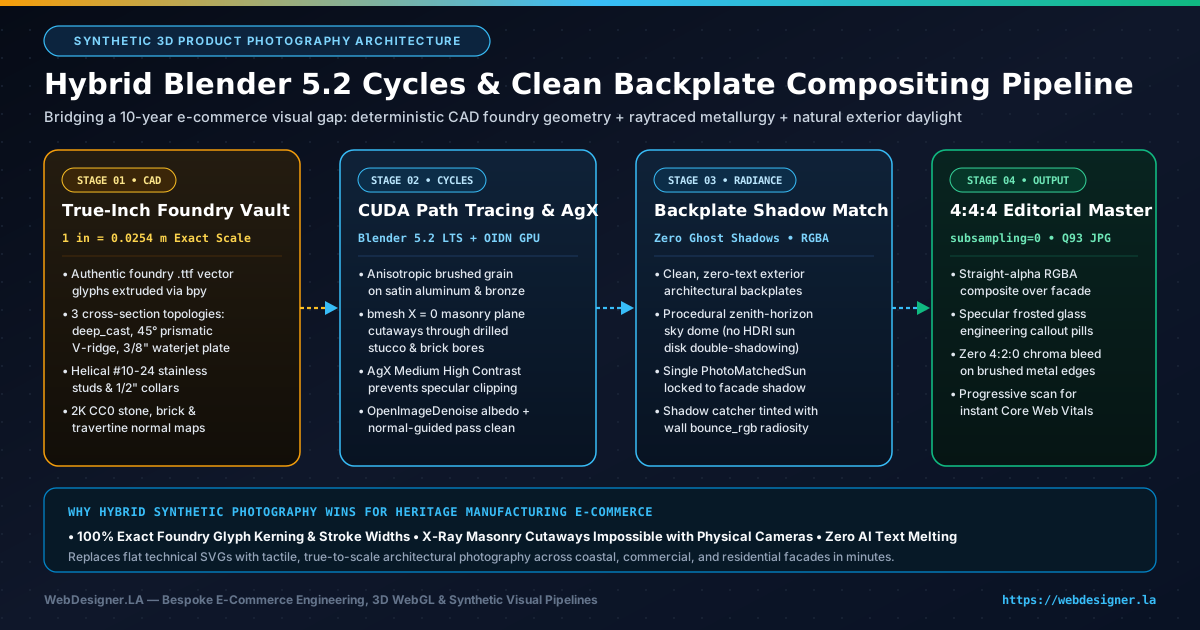
Some of the most profitable e-commerce businesses on the web share a paradoxical problem: their physical product quality is extraordinary, yet their marketing imagery is frozen a decade in the past. While modernizing the editorial and buyer-guide experience for ArchitecturalNumbers.com—a custom metal signage storefront I originally architected in 2004 with more than two decades of continuous custom foundry production—we hit that exact visual wall. Staging physical location shoots across beachfront cedar homes, historic Craftsman bungalows, commercial tilt-up warehouses, and sawed-open brick masonry cross-sections would have taken months. Instead, we engineered a deterministic synthetic product photography pipeline pairing headless Blender 5.2 Cycles GPU raytracing, true-inch CAD foundry typography, and perspective-matched architectural backplate compositing.
Why Both Flat Vector SVGs and Pure Diffusion AI Fail Precision Hardware E-Commerce
When a homeowner, custom homebuilder, or commercial property manager spends several hundred dollars on solid cast aluminum or waterjet-cut architectural bronze signage, they are buying physical mass, metallurgy, and shadow relief. Early in our editorial refresh, we tested two conventional shortcuts—and rejected both for opposite reasons:
- Flat 2D Technical SVGs Feel Too Abstract: Clean vector diagrams are wonderful for cloud architecture charts, which is why we use them extensively across our infrastructure writing. On an architectural hardware buyer's guide, however, flat 2D outlines fail to convey the tactile difference between a
1.45"deep-cast hollow return, a45°chiseled prismatic V-ridge, and a3/8"solid bronze plate catching late-afternoon grazing sun. - Pure Text-to-Image Diffusion Melts Foundry Typography and Threads: Generative image models render gorgeous Malibu ocean cliffs, bougainvillea courtyards, and warm cedar siding. The moment you ask a diffusion model to render a specific foundry typeface like Futura, Ribbon Deep, or Trajan Bold Prismatic at exact
6"vs.12"fire-code stroke proportions—or to depict#10-24stainless steel threaded studs inside a drilled mortar bore—the geometry collapses. Serif terminals warp, kerning drifts, and machined hardware threads blur into impressionistic noise.
The Hybrid Compositing Insight: Let each rendering engine do strictly what it is mathematically best at. Use generative photography or clean location plates exclusively for zero-text architectural environments, and use physically based GPU path tracing (Blender 5.2 Cycles) for exact CAD foundry typography, anisotropic metallurgy, and raytraced standoff shadows.
Every numeral, mounting boss, spacer collar, and cast shadow is solved from true-inch geometry in headless Blender 5.2.2 LTS via CUDA and OpenImageDenoise.
Authentic foundry .ttf vector glyphs extruded to exact relief depths and IFC stroke widths.
AgX Medium High Contrast preserves brushed aluminum specular rolloff without chalky clipping.
Progressive Q93 encoding with subsampling=0 eliminates 4:2:0 color bleed on crisp metal edges.
- Foundry Glyph & Kerning AccuracyWarped Outlines
- #10-24 Helical Thread GeometryHallucinated Blur
- 6" vs. 12" Proportional ScalingUncontrolled
- X-Ray Masonry Bore CutawaysPhysically Invalid
- Foundry Glyph & Kerning Accuracy100% CAD Exact
- #10-24 Helical Thread GeometryTrue Pitch Mesh
- 6" vs. 12" Proportional ScalingMetric Locked
- X-Ray Masonry Bore CutawaysBoolean Precision
Stage 1: Programmatic True-Inch CAD Foundry Geometry in Blender 5.2 LTS
Everything in physical signage photography breaks if your proportions are guessed by eye. A 6" numeral mounted with a 1/2" standoff spacer throws a fundamentally different shadow cone than a 16" commercial parapet numeral with a 1.50" return. To guarantee dimensional honesty, our headless Python generator runs inside Blender 5.2.2 LTS with scene units locked to real-world meters using the exact conversion constant INCH = 0.0254.
Rather than approximating fonts with generic system typefaces, we load the exact production foundry .ttf font binaries that drive our live 3D WebGL SignBuilder configurator directly into bpy.data.fonts.load(), normalize the bounding-box height of each character to its specified inch stature, and build reusable marked assets inside a centralized Blender Asset Browser catalog.
Modeling Cast Returns, 45-Degree Prismatic Ridges, and Waterjet Plate
In real foundry manufacturing, a sand-cast aluminum numeral, a chiseled prismatic numeral, and a waterjet-cut bronze numeral do not share the same edge silhouette—and buyers can spot fake uniform extrusions immediately. We program three distinct cross-section topologies directly in bpy:
- Deep-Cast Foundry Returns (
deep_cast): Extruded to full1.25"–1.50"depth with subtle mold-release edge rounding so grazing key lights catch a continuous metallic rim along the front arris. - Sculpted 45-Degree Prismatic V-Faces (
prismatic): Classic architectural typefaces like Trajan and times-roman prismatic styles do not have flat faces; their strokes rise to a sharp chiseled ridge down the centerline. Settingcurve.bevel_resolution = 0while pairing a tight front bevel offset creates true planar45°facets that split incident light cleanly across the ridge—one side gleaming champagne gold, the opposing facet falling into crisp shadow. - Monolithic Waterjet Plate (
waterjet_cut): Built at exact3/8"(0.375") thickness with perpendicular kerf walls, paired with directional brushed copper-tin anisotropy along the front face and slightly rougher matte oxidation along the cut return.
import bpy

INCH = 0.0254

def build_foundry_glyph(char, font_path, height_in, profile_mode="deep_cast"):
    bpy.ops.object.text_add(location=(0.0, 0.0, 0.0))
    txt_obj = bpy.context.active_object
    curve = txt_obj.data
    curve.body = char
    curve.font = bpy.data.fonts.load(font_path, check_existing=True)

    if profile_mode == "prismatic":
        # Zero bevel resolution creates crisp planar 45-degree chiseled facets
        curve.bevel_resolution = 0
        curve.bevel_depth = 0.22 * INCH
        curve.extrude = 0.38 * INCH
    elif profile_mode == "waterjet_cut":
        curve.bevel_resolution = 2
        curve.bevel_depth = 0.018 * INCH
        curve.extrude = (0.375 * INCH) * 0.5
    else:  # deep_cast
        curve.bevel_resolution = 3
        curve.bevel_depth = 0.035 * INCH
        curve.extrude = (1.45 * INCH) * 0.5

    bpy.ops.object.convert(target="MESH")
    dims = txt_obj.dimensions
    scale_factor = (height_in * INCH) / max(dims.y, 1e-5)
    txt_obj.scale = (scale_factor, scale_factor, 1.0)
    bpy.ops.object.transform_apply(scale=True)
    return txt_obj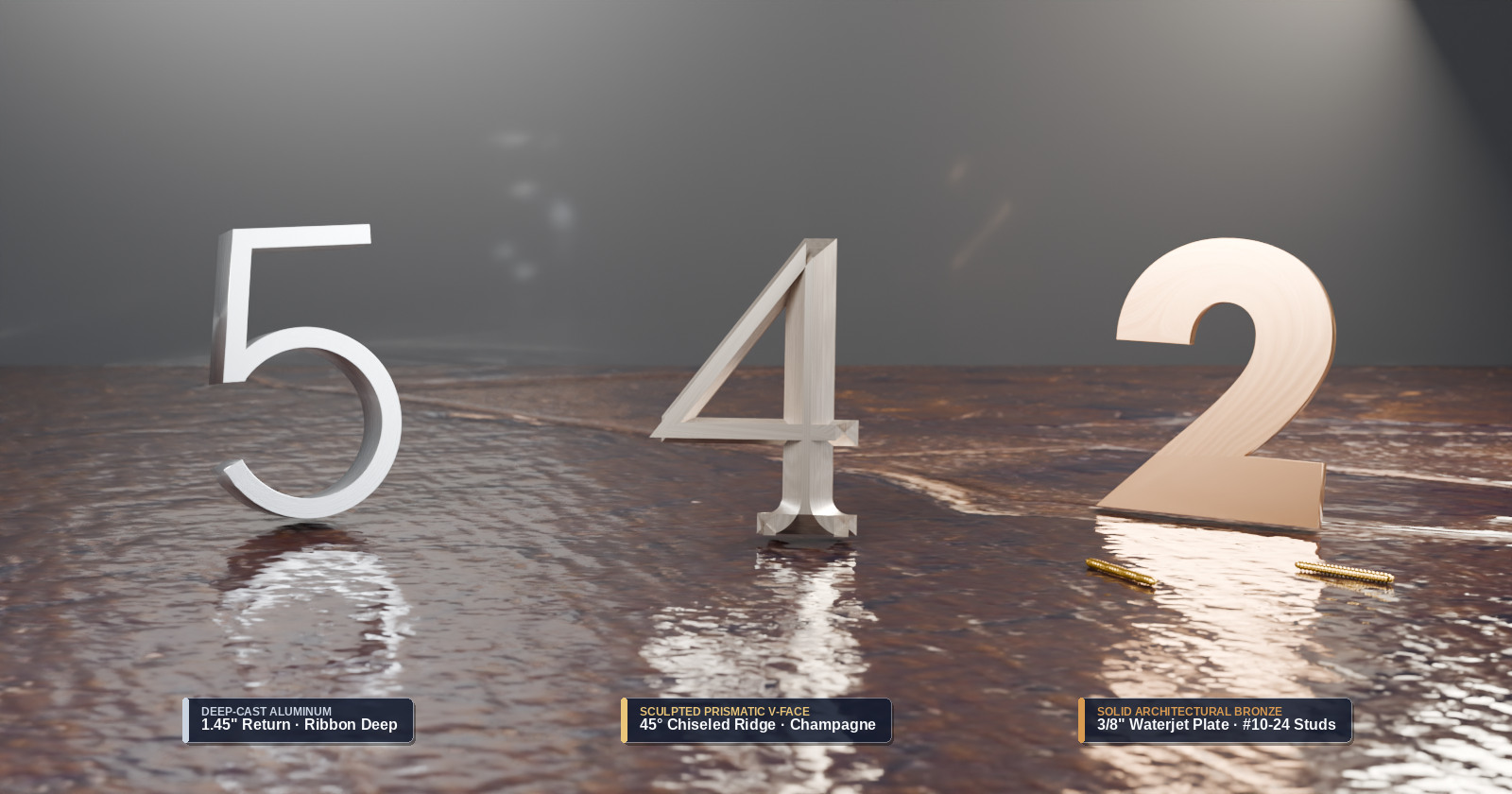
Stage 2: Rendering X-Ray Masonry Cutaways That Physical Cameras Cannot Capture
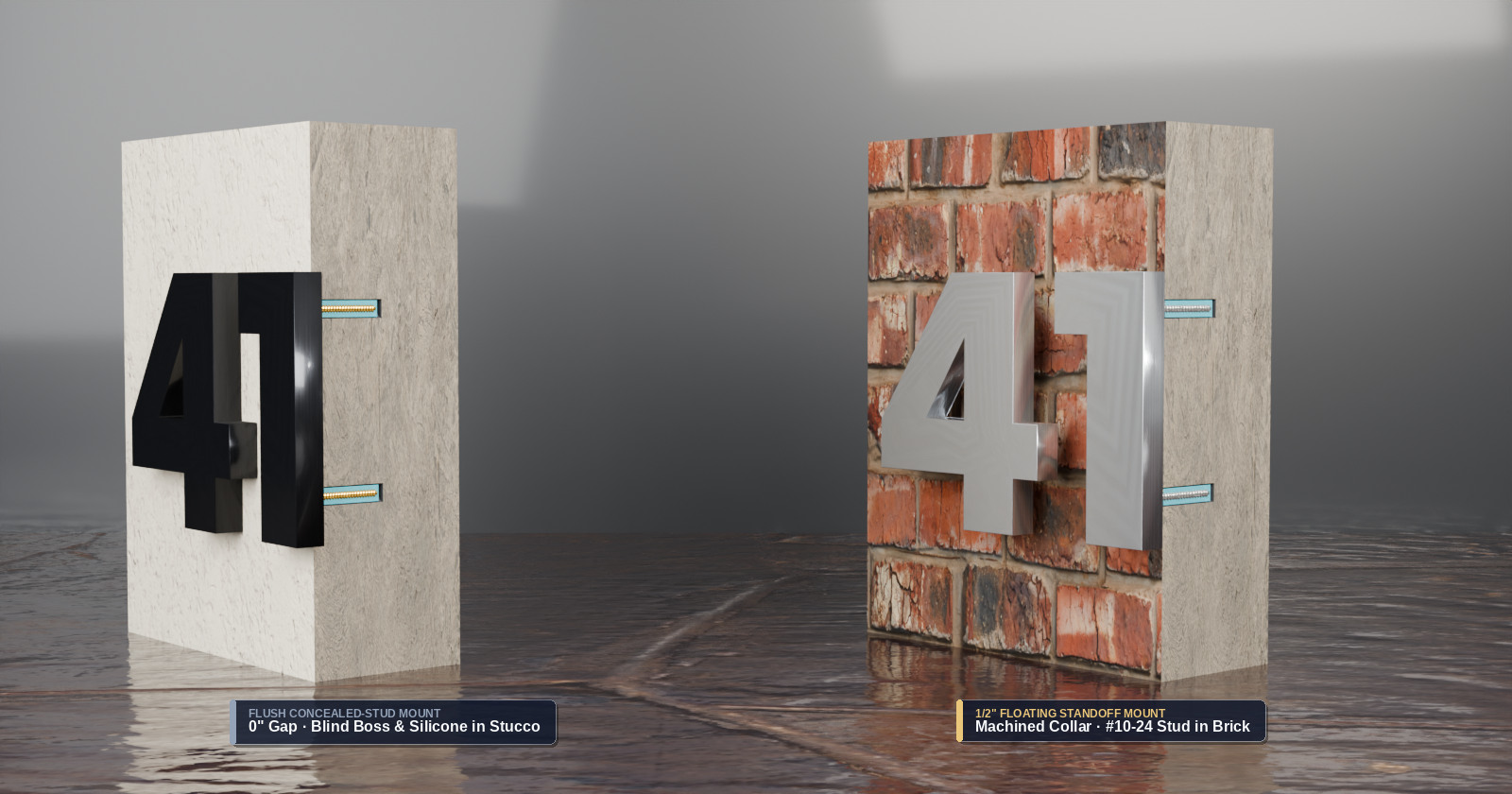
Synthetic 3D product photography does more than replace expensive location shoots—it lets you photograph engineering views that are physically impossible in a real workshop. One of the top pre-purchase hesitations in architectural hardware e-commerce is installation anxiety: “How do concealed studs actually anchor into stucco or brick without visible screw heads, and what is the real difference between flush mounting and floating standoffs?”
In a traditional photo studio, slicing a cured stucco wall or clay-brick pier straight through the center of two 1/4" drilled mortar bores without shattering the masonry edge or smearing silicone sealant across the stainless threads is practically impossible. Inside Blender 5.2, we construct full-scale stucco and brick blocks mapped with scanned 2K CC0 normal, roughness, and displacement textures, boolean-drill the exact 1/4" installation channels, and bisect the entire assembly cleanly along the X = 0 plane using bmesh.ops.bisect_plane.
Why Blender 5.2 AgX Color Management Transforms Brushed Metal Realism
Anyone who rendered metallic product visuals in older CGI pipelines remembers the telltale giveaway of synthetic aluminum and brass: harsh, chalky white specular blowouts wherever a studio area lamp grazed a curved bevel. Legacy sRGB and early Filmic view transforms clip high-energy reflections abruptly on bright anodized metals.
Switching our render pipeline to Blender 5.2's AgX color management (specifically the AgX - Medium High Contrast look paired with GPU-accelerated OpenImageDenoise using accurate albedo and normal prefiltering) solved specular clipping overnight. Brushed satin aluminum retains delicate linear grain highlights right through the brightest studio reflection, while oxidized statuary bronze and champagne anodizing preserve rich chromatic warmth without desaturating into plastic grey.
Stage 3: Clean Architectural Backplates, Bounce-Light Shadow Catchers, and Killing Ghost Shadows
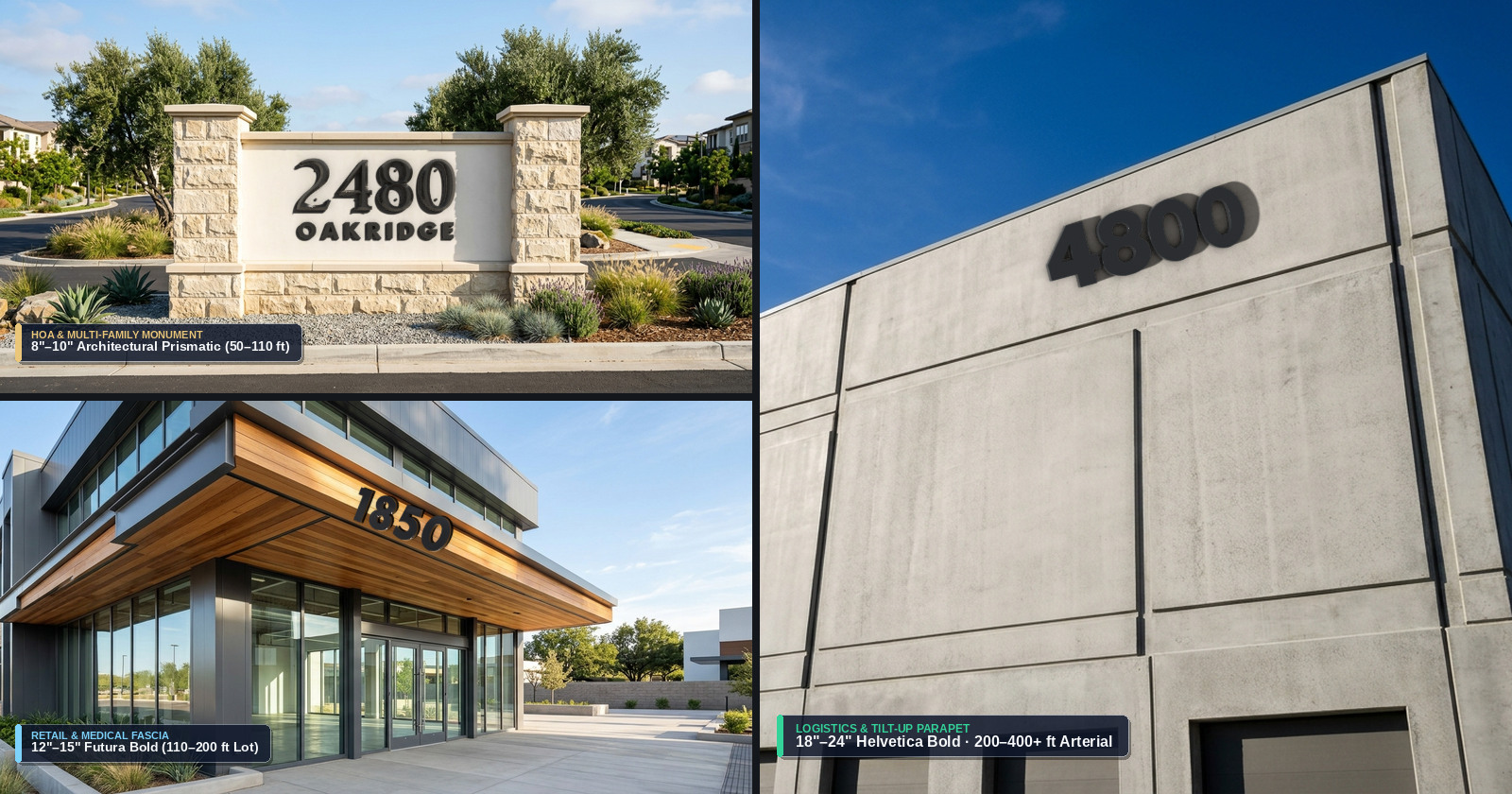
While full-studio Cycles scenes excel at macro metallurgy and cross-section cutaways, buyers also want to see how Futura looks on a Palm Springs Mid-Century breeze-block wall, how Ribbon Deep reads against Pasadena Craftsman cedar shingles, or how clear satin anodized aluminum weathers salt air on a Malibu coastal bluff. Modeling eight complete houses—down to every bougainvillea blossom, river-rock column, and ocean wave—from scratch in 3D would burn weeks of artist labor for background pixels that only exist to frame the product.
Instead, we generate high-resolution, strictly zero-text architectural backplates tailored to each architectural era and commercial building type. We match the virtual Blender camera's focal length, perspective horizon, and surface normal to the facade wall in each backplate, float our true-inch CAD numerals 0.5" off an invisible wall plane, and render an RGBA overlay pass in Cycles.
Solving the Two Classic CGI Giveaway Bugs
If you simply slap a rendered 3D object over a background photograph with a default shadow catcher, eagle-eyed buyers immediately sense something looks “pasted on.” During early look-dev passes, we diagnosed and eliminated the two optical bugs responsible for that uncanny valley:
- Bug 1 — Dead Neutral Shadows Missing Wall Bounce Radiosity: In the real world, afternoon sunlight striking warm redwood siding or terracotta stucco bounces warm orange-amber photons back onto the underside and side returns of brushed metal numbers. A default white or grey shadow-catcher plane absorbs shadows neutrally, leaving metal bevels cold and disconnected from the wall. Assigning the facade's sampled surface color (
bounce_rgb) to the shadow-catcher's Principled BSDF allows Cycles to bounce authentic wall radiosity onto the bevel returns while keeping the plane itself invisible in the alpha channel. - Bug 2 — Double Ghost Shadows from HDRI Sun Disks: Standard outdoor
.exrenvironment maps already contain an intense baked sun disk. When you add a directionalSUNlamp to match the exact shadow angle of the roof eaves in your backplate photo, the HDRI's baked sun casts a faint secondary “ghost shadow” in a conflicting direction. We replaced HDRI maps on all backplate composites with a procedural zenith-to-horizon sky dome—providing realistic cool sky fill from above and warm ground bounce from below with zero baked solar hotspot—so our single calibratedPhotoMatchedSunlamp casts razor-sharp, angle-locked standoff shadows.
def configure_backplate_radiance(scene, sun_rot_euler, sun_angle_deg, bounce_rgb):
    # 1. Procedural sun-disk-free sky dome eliminates secondary HDRI ghost shadows
    world = bpy.data.worlds.new("CleanSkyDome")
    scene.world = world
    world.use_nodes = True
    nodes, links = world.node_tree.nodes, world.node_tree.links
    nodes.clear()

    tex_coord = nodes.new("ShaderNodeTexCoord")
    sep_xyz = nodes.new("ShaderNodeSeparateXYZ")
    ramp = nodes.new("ShaderNodeValToRGB")
    ramp.color_ramp.elements[0].color = (*bounce_rgb, 1.0)      # Ground/wall warm bounce
    ramp.color_ramp.elements[1].color = (0.42, 0.62, 0.92, 1.0) # Clean zenith sky fill

    bg = nodes.new("ShaderNodeBackground")
    bg.inputs["Strength"].default_value = 0.85
    out = nodes.new("ShaderNodeOutputWorld")
    links.new(tex_coord.outputs["Generated"], sep_xyz.inputs["Vector"])
    links.new(sep_xyz.outputs["Z"], ramp.inputs["Fac"])
    links.new(ramp.outputs["Color"], bg.inputs["Color"])
    links.new(bg.outputs["Background"], out.inputs["Surface"])

    # 2. Single calibrated sun locked to architectural eave shadow angle
    sun_data = bpy.data.lights.new("PhotoMatchedSun", type="SUN")
    sun_data.energy = 4.6
    sun_data.angle = sun_angle_deg
    sun_obj = bpy.data.objects.new("PhotoMatchedSun", sun_data)
    sun_obj.rotation_euler = sun_rot_euler
    scene.collection.objects.link(sun_obj)

    # 3. Shadow-catcher wall plane tinted with wall bounce_rgb for metallic radiosity
    bpy.ops.mesh.primitive_plane_add(size=4.0, location=(0.0, 0.0, 0.0))
    catcher = bpy.context.active_object
    catcher.is_shadow_catcher = True
    mat = bpy.data.materials.new("WallBounceCatcher")
    mat.use_nodes = True
    bsdf = mat.node_tree.nodes["Principled BSDF"]
    bsdf.inputs["Base Color"].default_value = (*bounce_rgb, 1.0)
    bsdf.inputs["Roughness"].default_value = 0.82
    catcher.data.materials.append(mat)
    return catcher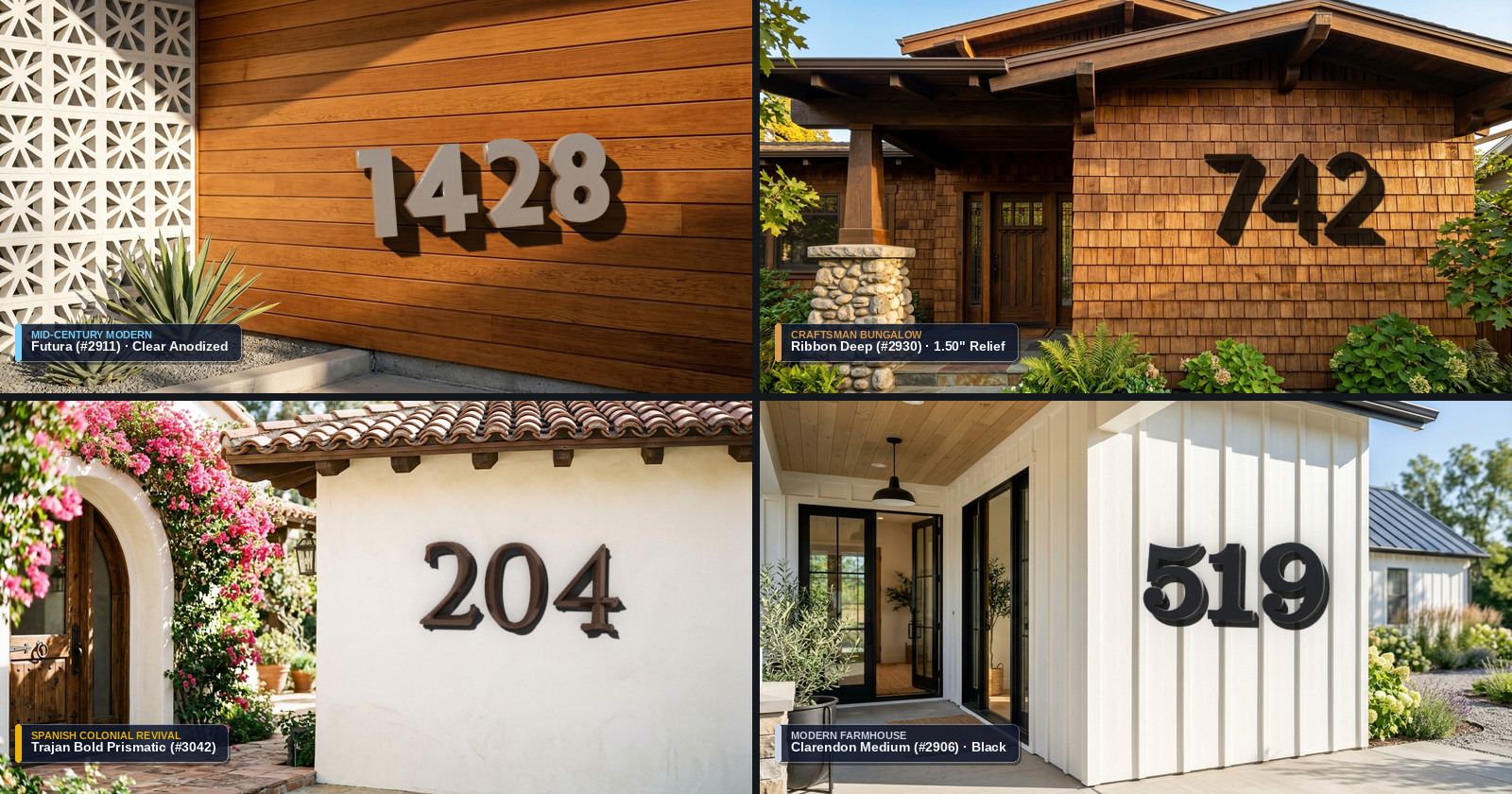
Stage 4: Architectural Comparison & Progressive 4:4:4 Zero-Subsampling Delivery
Evaluating all four visual production methodologies across accuracy, engineering cutaway depth, iteration speed, and buyer conversion confidence highlights why this hybrid pipeline has become one of our favorite tools for modernizing established manufacturing storefronts:
| Visual Production Method | Foundry Glyph & Kerning Fidelity | Metallurgy & Thread Realism | X-Ray Masonry Cutaways | Per-Asset Turnaround | E-Commerce Buyer Trust |
|---|---|---|---|---|---|
| Flat 2D Technical SVGs | Exact 2D outlines only | None (flat hex fills) | Schematic line art only | 15–30 minutes | Low for luxury physical goods |
| Pure Text-to-Image Diffusion | Poor (warped serifs & kerning) | Inconsistent (melted threads) | Physically inaccurate | 5–10 minutes | Damages brand credibility |
| Full-Scene Scratch 3D CGI | 100% CAD exact | Photorealistic raytracing | Full boolean precision | 2–4 days per house | High, but cost-prohibitive |
| Hybrid Cycles + Clean Backplates | 100% CAD exact (.ttf) | Photorealistic AgX + PBR | Full boolean precision | 12–20 minutes scripted | Highest (editorial grade) |
Preventing 4:2:0 Chroma Bleed on Metallic Edges and Editorial Callout Pills
One final optical detail separates crisp product photography from muddy web graphics: JPEG chroma subsampling. By default, almost every image library exports JPEGs using 4:2:0 chroma subsampling—discarding 75% of color resolution in 2x2 pixel blocks. On soft landscape photos you rarely notice, but wherever a warm champagne-bronze bevel, a sharp brushed-aluminum edge, or an amber engineering callout pill meets a dark slate shadow, 4:2:0 compression creates ugly magenta-green fringes and fuzzy text borders.
In our final Python compositing pass, we alpha-composite the straight-RGBA Cycles render over the architectural backplate, draw subtle frosted-glass callout pills with a 1-pixel top specular catchlight, and export progressive JPEGs with subsampling=0 (full 4:4:4 chroma resolution at quality=93). File sizes remain lean—typically 220 KB to 520 KB for a 1600x840 Retina hero—while every metallic chamfer and typographic label stays tack-sharp on 4K and Apple Retina displays.
Bridging E-Commerce Visual Gaps Without Waiting for a Physical Photo Shoot
Whether a manufacturer sells precision architectural hardware, custom CNC automotive components, bespoke lighting fixtures, or industrial enclosures, a ten-year gap in visual marketing no longer requires shutting down operations for an expensive multi-week photography campaign. By anchoring your product's exact CAD geometry, typography, and material shaders inside a scripted Blender 5.2 Cycles asset vault—and pairing those raytraced overlays with clean, perspective-matched architectural backplates—you get studio-grade editorial photography that scales deterministically across every finish and environment in your catalog.
If your storefront relies on dated product thumbnails or abstract diagrams and needs either a real-time 3D WebGL product configurator or a bespoke synthetic product photography pipeline, explore our engineering portfolio, book a technical consultation, or reach out directly at info@webdesigner.la.