
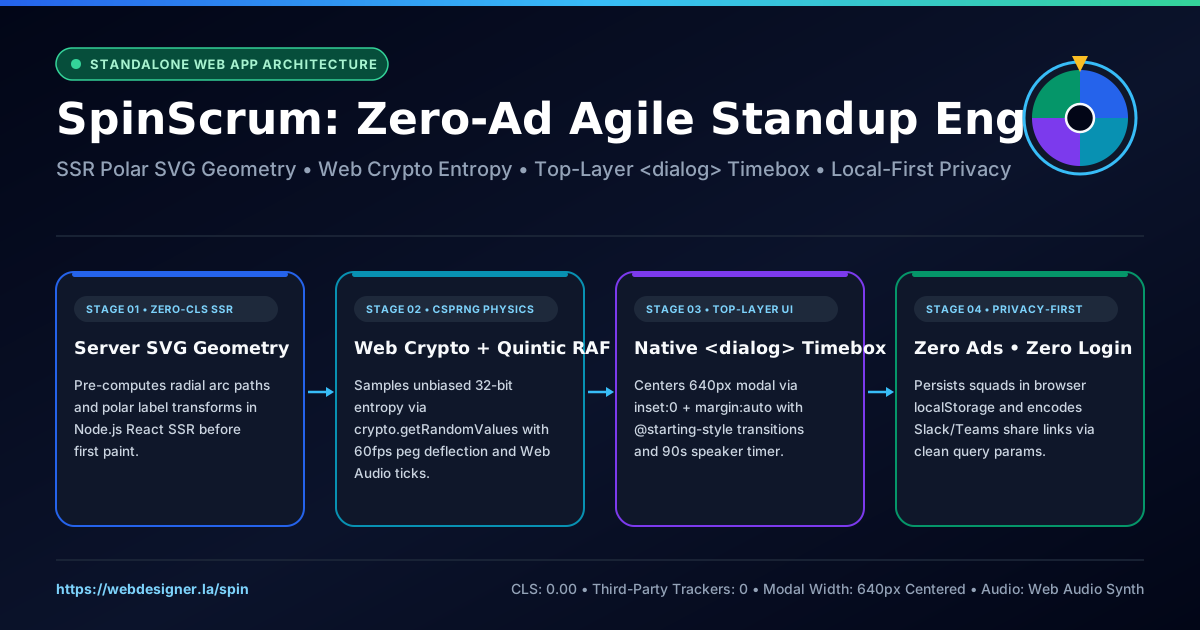
Every distributed engineering squad eventually collides with two Daily Scrum problems: predictable round-robin speaker queues that put half the Zoom call to sleep, and free browser wheel-spinner utilities plastered with programmatic banner ads, cookie consent walls, and account-signup popups right in the middle of a live screen share. To give engineering leads, Scrum Masters, and product squads a clean, instant instrument they can project with confidence, we built SpinScrum (webdesigner.la/spin)—a standalone, 100% ad-free agile standup wheel and per-speaker countdown timer engineered with server-rendered SVG polar geometry, unbiased Web Crypto physics, synthesized Web Audio peg acoustics, and native top-layer HTML <dialog> modals.
1. Why Round-Robin Standups Stall—and Why Screen-Shared Tools Must Be Standalone
The Scrum Guide defines the Daily Scrum as a focused 15-minute timeboxed event for Developers to inspect progress toward the Sprint Goal and adapt the upcoming day's plan. Yet when an eight-person squad walks down an alphabetical Slack roster every morning, two failure modes emerge immediately:
- Predictable Queue Disengagement: Engineers near the bottom of a fixed speaker order spend the first ten minutes mentally rehearsing their own bullet points rather than listening for cross-service blockers or API contract changes announced by teammates.
- Sixteenth-Minute Drift: Without a visible, low-friction per-speaker timebox, early speakers unintentionally burn four minutes troubleshooting an architectural tangent while the remaining five developers rush through ten-second monologues.
Randomized turn selection paired with a gentle 60-to-120-second visual timebox restores attention—provided the tool itself behaves like a dedicated workspace application rather than a content blog. When designing /spin, we isolated the route inside a standalone application layout branch (body.wd-spin-standalone-body) that strips away portfolio headers, navigation links, blog sidebars, and third-party scripts. Opening https://webdesigner.la/spin drops the facilitator straight into a dark-obsidian dual-column stage optimized for 1080p and 4K screen sharing.
2. Zero-CLS Server-Rendered Polar SVG Wheel Geometry
Most spinning-wheel widgets render an empty <canvas> placeholder on initial page load and wait for client JavaScript hydration before drawing wedges. That deferred paint introduces visible layout pop-in and leaves query-parameter links blank until bundle execution completes.
In SpinScrum, the Node.js and React SSR layer parses incoming ?team= and ?members= query parameters on the HTTP request itself and computes exact SVG radial arc segments before the first byte reaches the browser:
// Polar wedge path generation shared identically between React SSR and client UMD
const startRad = (startDeg * Math.PI) / 180;
const endRad = (endDeg * Math.PI) / 180;
const midRad = ((startDeg + sliceDeg / 2) * Math.PI) / 180;

const x1 = Number((cx + radius * Math.cos(startRad)).toFixed(3));
const y1 = Number((cy + radius * Math.sin(startRad)).toFixed(3));
const x2 = Number((cx + radius * Math.cos(endRad)).toFixed(3));
const y2 = Number((cy + radius * Math.sin(endRad)).toFixed(3));
const largeArc = sliceDeg > 180 ? 1 : 0;

const pathData = `M ${cx} ${cy} L ${x1} ${y1} A ${radius} ${radius} 0 ${largeArc} 1 ${x2} ${y2} Z`;
Because both the server component and the client-side controller share identical floating-point precision and polar label placement (radius * 0.58), the wheel arrives in the initial HTML document at 0.00 Cumulative Layout Shift—even when a Scrum Master pastes a custom twelve-person squad URL into Slack.
3. Unbiased Web Crypto Entropy, Quintic Ease-Out & Synthesized Peg Audio
Developers notice immediately when a standup wheel relies on naive Math.random() clamping or pre-selected CSS keyframe stops that appear to favor certain slices. SpinScrum drives every spin through three deterministic physical layers:
| Subsystem | Implementation | UX & Engineering Guarantee |
|---|---|---|
| Entropy Source | window.crypto.getRandomValues(new Uint32Array(2)) |
Cryptographically uniform 32-bit angular target across 5 to 8 full revolutions. |
| Angular Kinematics | Quintic ease-out 1 - Math.pow(1 - t, 5) over 4200ms |
Crisp initial impulse followed by suspenseful sub-degree deceleration near rim pegs. |
| 12-O'Clock Resolver | ((270 - (rotation % 360)) + 360) % 360 |
Exact mathematical parity between the visual top pointer at 270° and the selected speaker. |
| Acoustic Feedback | Web Audio API triangle-wave peg impulse + C-major triad | Zero external .mp3 network requests, zero audio preload lag, instant mute persistence. |
As each slice boundary crosses the top pointer at 270°, the client engine triggers a brief mechanical pointer deflection alongside a 32-millisecond synthesized wooden-peg click, giving remote participants tactile visual and audio confirmation without loading a single external media file.
4. Centering Commanding Top-Layer <dialog> Modals Across Legacy CSS Resets
Once the wheel settles on the next speaker, the winner announcement cannot feel like a cramped corner toast—it is the centerpiece of the ceremony on a shared monitor. We built the winner card around the native HTML <dialog closedby="any"> element promoted to the browser's top layer via dialog.showModal().
Building production <dialog> interfaces inside an existing multi-page stylesheet surfaces four subtle platform edge cases worth documenting for frontend teams:
- Neutralizing Global
* { margin: 0 }Resets: Browser user-agent stylesheets center modal dialogs usingmargin: auto. Any global stylesheet containing a universal* { margin: 0; padding: 0; }reset silently overrides the UA margin and pins<dialog>:modalto pixel(0, 0)in the upper-left corner. Explicitly declaringposition: fixed; inset: 0; margin: auto; width: min(640px, calc(100vw - 32px)); max-width: 640px;guarantees dead-center horizontal and vertical alignment on every viewport. - Never Setting Unconditional
displayondialog: Declaringdisplay: flexordisplay: blockon the basedialogselector breaks its hidden closed state. Display rules must be scoped strictly todialog[open]. - Scroll Locking via
::backdropContainment: Pairingdialog:modal { overscroll-behavior: contain; }withdialog::backdrop { overflow: hidden; overscroll-behavior: contain; }turns the backdrop pseudo-element into a scroll container so trackpad momentum never scrolls the underlying page. - Discrete Top-Layer Entry & Exit Transitions: Using
@starting-stylealongside longhandtransition-behavior: allow-discreteanimates scale and backdrop blur smoothly—backed by a runtimegetComputedStylecapability check for browsers that parseallow-discretewithout transitioningdisplay.
Inside the centered 640px modal, SpinScrum pairs the selected engineer's initials avatar and ceremony prompt with a tabular-numeral countdown timer (
1:00,1:30, or2:00), a live depleting progress bar, and a single-click Mark Spoken & Spin Next Speaker workflow that tracks everyone who has already given their update.
5. Four Ceremony Modes, Local Squad Persistence & Stateless Share Links
Agile teams run more than morning standups, so the top application bar switches seamlessly across four ceremony prompts without reloading the page:
- Daily Standup: What shipped yesterday, what is today's focus, and any blockers?
- Sprint Retro: Share one win, one friction point, and one experiment for next sprint.
- PR Reviewer: Selected engineer takes primary code review & architectural sign-off.
- Team Icebreaker: Quick 60-second prompt before diving into sprint execution.
Engineering managers juggling multiple squads—such as Platform Infrastructure, Mobile Core, and QA Automation—can save unlimited rosters directly in browser localStorage with zero accounts or cookies. Need to pin a permanent standup link in a Slack channel bookmarks bar? Clicking Share Squad Link encodes the active squad name and roster directly into a clean URL:
https://webdesigner.la/spin?team=Platform+Squad&members=Alex,Maya,Jordan,Samira,Devon,ElenaTry the live standalone application for your next sprint ceremony at https://webdesigner.la/spin.