
Most teams assume their site is backed up because a WordPress plugin emails them a green checkmark once a week—right up until an unpatched third-party plugin exploit drops an obfuscated webshell, injects pharma spam into wp_posts, or encrypts local backup archives sitting inside /wp-content/. Real WordPress disaster recovery is not a dashboard plugin; it is an infrastructure-level runbook governed by strict Recovery Point Objectives (RPO), verified clean-room rebuilds, and immutable off-host backups that a compromised PHP worker can never overwrite or delete.
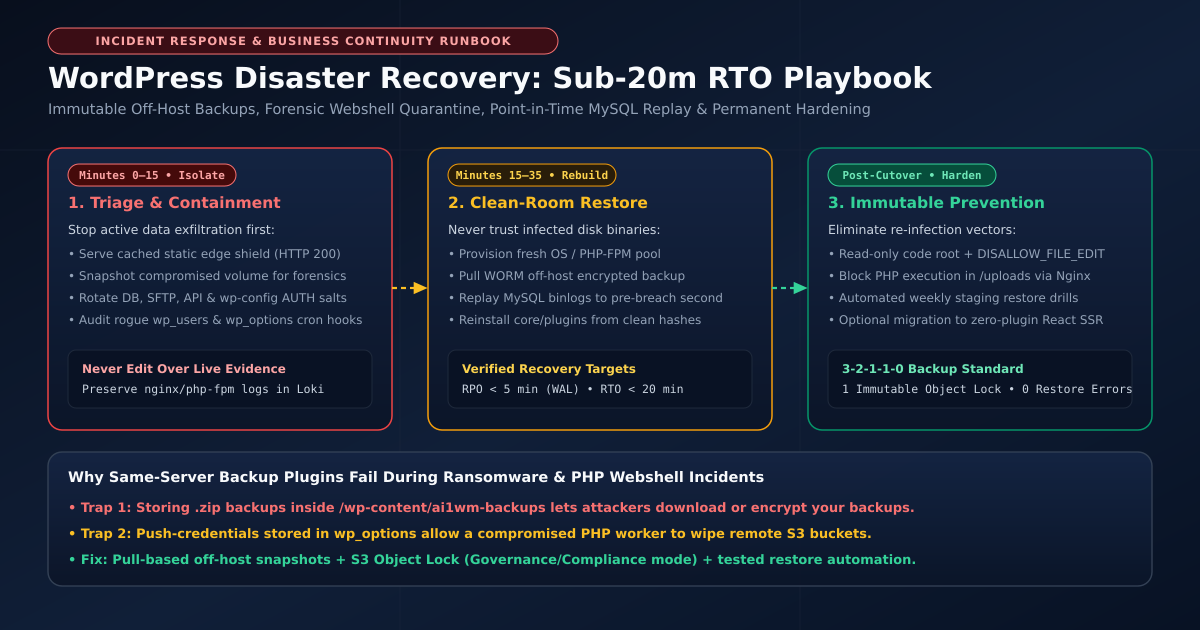
1. Why In-Dashboard Backup Plugins Fail Under Hostile Conditions
Relying on PHP backup plugins running inside the same WordPress runtime they are supposed to protect violates basic security isolation in two fatal ways:
- Local Archive Exposure: Plugins that stage
.zipor.wpresssnapshots inside web-accessible subdirectories frequently leave multi-gigabyte database dumps exposed to unauthenticated directory scrapers or local ransomware encryption. - Compromised Push Credentials: If your WordPress database stores read/write AWS S3 or SFTP credentials in plaintext inside
wp_optionsso the plugin can push nightly backups, any SQL injection or Remote Code Execution attacker immediately inherits the keys needed to purge your remote backup bucket too.
Eliminate that blast radius by inverting control: pull encrypted filesystem and database snapshots from an external backup vault host, or push using append-only credentials backed by S3 Object Lock (WORM Compliance/Governance mode) so historical recovery points cannot be deleted even with stolen site keys.
2. Minute-by-Minute Incident Runbook: Achieving a Sub-20m Recovery Time Objective
When monitoring alerts fire on unexpected 500 spikes, Google Safe Browsing warnings, or unauthorized file modifications, improvising on a live SSH session destroys forensic evidence and prolongs downtime. Follow a disciplined three-window sequence to hit a sub-twenty-minute Recovery Time Objective:
| Recovery Window | Primary Objective | Non-Destructive Engineering Actions |
|---|---|---|
Minutes 0–10 |
PHP webshell containment & UX continuity | Serve cached static HTML at Nginx/Cloudflare edge; detach compromised PHP-FPM upstream from public POST writes; snapshot disk & memory for forensics. |
Minutes 10–25 |
Clean-room OS & checksummed code rebuild | Boot a fresh Linux worker pool; install core and plugins strictly from verified upstream SHA checksums (wp core verify-checksums)—never copy PHP files from the infected volume. |
Minutes 25–35 |
Point-in-time MySQL binlog replay & secret rotation | Restore last clean base dump + replay binary logs up to the exact pre-compromise timestamp; audit wp_users, wp_options autoloaded hooks, and rotate all DB, API, and wp-config.php AUTH salts. |
3. Point-in-Time MySQL Binlog Replay for Zero Lost WooCommerce Orders
Nightly SQL dumps carry a 24-hour RPO—meaning restoring yesterday's backup wipes out an entire day of legitimate WooCommerce customer orders, paid invoices, and form leads. Enabling row-based binary logging (binlog_format = ROW) with continuous off-host shipping shrinks your data-loss window to seconds.
During clean-room restoration, restore the last verified base snapshot into an isolated database instance, inspect the binary log event stream in your telemetry window to locate the exact GTID or timestamp immediately preceding the malicious payload injection, and replay clean customer transactions forward while excluding the attacker's statements.
4. Post-Recovery Hardening: Closing the Re-Infection Loop
Restoring a backup without sealing the entry vector guarantees the same automated botnet will re-infect the server within hours. Before switching the load balancer upstream to the clean-room pool, enforce four structural controls:
- Immutable Code Root & Disabled Runtime Editors: Mount core, theme, and plugin directories read-only for the
php-fpmuser and setdefine('DISALLOW_FILE_EDIT', true);anddefine('DISALLOW_FILE_MODS', true);in production so all updates flow strictly through version-controlled CI pipelines. - Zero PHP Execution Inside Media Uploads: Explicitly reject
location ~* ^/wp-content/uploads/.*\.(php|phar|phtml)$ { deny all; }at the Nginx edge layer so polyglot image uploads can never execute as scripts. - Isolated Per-Site Linux Users & Systemd Sandboxes: Never host multiple WordPress tenants under a single shared
www-datapool where one vulnerable plugin compromises neighboring domains. - Automated Weekly Staging Restore Drills: An untested backup is only a wish. Schedule an automated job that restores your latest encrypted snapshot into an ephemeral loopback container, runs HTTP 200 and checksum assertions, and logs the verified RTO receipt.
Tired of Constant Plugin Zero-Days & Maintenance Drills? Read our companion case studies on WordPress Hack Postmortem & Continuity Planning and Migrating Legacy WordPress to Sub-Second TypeScript SSR.
Need Emergency WordPress Recovery or Managed Hardening?
Whether recovering from an active incident, setting up immutable off-host disaster recovery, or migrating off fragile WordPress plugins altogether, reach out directly to Principal Architect Robert Baindourov.